
Table of Contents
Main Toolbar #

Measure/Draw Toolbar #



Toolbar Tools #
| Tool | Function |
| Hides / Shows menu. SHIFT + Click on Home icon moves the menu from top to left-side. | |
 | Print Map – Print Templates, Save Image, and Change Scale |
 | Layer Control – Turn layers on/off, Filter Layers, Toggle Basemaps, Layer Settings, Layer Styles |
 | Legend – View the spatial items and their symbology in the map |
 | Bookmarks – predefined locations that you can navigate to |
 | Swap Map – Toggle between maps |
 | Show InfoMap in a full window/screen |
| Configure Map Settings | |
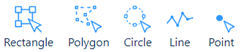 | Select Features Use different Select methods shown below Select by Rectangle Select by Polygon Select by Circle Select by Line Select by Poiht |
 | Add to Selection Remove from Selection |
 | Choose fields to select |
 | Clear Selection |
 | Drawing & Measuring Tools |
 | Zoom In and Zoom Out |
 | Navigate Previous/Next |
 | Location Map Interactive move Location Map to move main map |
| Auto Scale |


